Home / Buying guides / Pro audio
Pro audio
Best audio mixers for bands, venues, DJs, schools and churches
By the buychecked team · Updated 9 October 2026 · Prices refresh daily from the retailer feed
The right mixer is mostly a matter of counting. Work out how many microphones you need to plug in at once, add your line sources such as keyboards, laptops and backing tracks, then allow a couple of spare channels. For a solo singer or a school assembly that might be four inputs. For a five-piece band with a drum kit it can easily be sixteen or more. Buy too few channels and you will be swapping cables mid-event; buy far too many and you are paying for a bigger, heavier desk than you need.
Our best all-round pick is the Studiomaster 12 Channel PA Mixer with Effects and Bluetooth, which gives eight microphone channels, built-in effects and USB/SD playback and recording at a mid-range price. The Cobra Compact 6 Channel Mixer is the best budget choice for small setups, the Citronic 10 Channel Powered Mixer saves you buying a separate amplifier, and the Allen & Heath QU-16 is the premium digital option for bands and venues that need recallable scenes.
Below are seven mixers across budget, mid-range and premium price bands, followed by plain advice on channel count, effects, USB and the analogue versus digital question.
How we chose
We have not used these mixers ourselves. We shortlisted them by comparing the published specifications, features, price and the retailer's information across the mixer range we list, looking at microphone input count, stereo inputs, phantom power, onboard effects, USB and Bluetooth, outputs and whether the desk is analogue, digital or powered. We aimed for a spread of sizes and prices that covers the most common UK uses, from a single performer to a gigging band, and avoided listing several sizes of the same model unless they suit clearly different buyers.
1. Best overall
12 Channel PA Mixer with Effects & Bluetooth
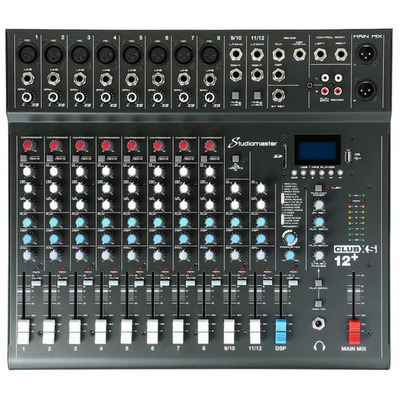
£272.00 at Terralec · best for small bands, function acts and school halls
The Studiomaster 12 Channel PA Mixer hits the size most small bands and halls actually need: eight microphone channels plus two stereo channels for keyboards, laptops or a playback source. Each mic/line channel gets 3-band EQ, two auxiliary sends, a compressor control and a mute switch, which covers monitor mixes and basic vocal control without extra outboard gear. The 16 built-in DSP effects handle reverb and delay on vocals, while the USB/SD media player and Bluetooth let you play interval music and record the main mix. Main outputs are on balanced XLR, and there is a footswitch socket, listed in the retailer's information, so a performer can switch effects on and off from the stage. It sits in the mid-range price band and is compact enough for a car boot.
✓ Pros
- Eight mic channels suit a typical small band or assembly
- Compressor and mute on every mic and line channel
- Built-in effects, Bluetooth and USB/SD play and record
- Balanced XLR main outputs
✕ Cons
- Stereo channels only get 2-band EQ
- Two aux sends limit you to a couple of separate monitor mixes
- Analogue, so settings cannot be saved and recalled
2. Best budget
Compact 6 Channel Mixer with DSP Effects, MP3 Player and Bluetooth
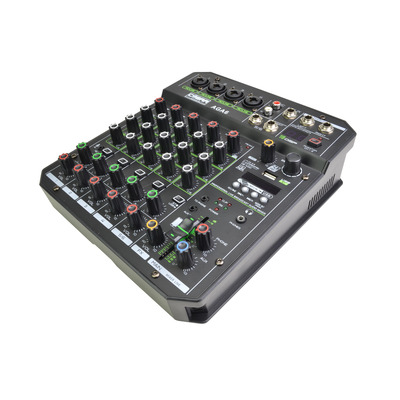
£88.00 at Terralec · best for solo singers, podcasts and small rooms
The Cobra Compact 6 Channel Mixer is one of the cheapest desks in the range that still covers the basics properly. It has four mono channels on combo XLR/jack sockets with phantom power, so it will run condenser microphones as well as standard dynamic vocal mics, plus a stereo input. Sixteen DSP effects can be switched in on channels 1 to 4, and there is a built-in media player with Bluetooth. The listing also mentions a two-way soundcard and 3.5mm phone input and output, which makes it useful for podcasting or streaming as well as live use. EQ is a simple high and low per channel, so it is a tool for straightforward jobs rather than detailed band mixing.
✓ Pros
- Very low price for four phantom-powered mic inputs
- Built-in effects, Bluetooth and USB connectivity
- Small and light enough to keep in a bag
✕ Cons
- Only two-band EQ per channel
- Four mic channels will be outgrown by most bands
- No aux sends mentioned for separate monitor mixes
3. Best compact USB mixer
8 Channel Audio Mixer Compact Design with DSP USB and Bluetooth
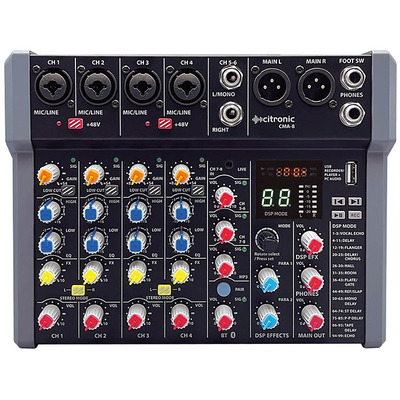
£104.50 at Terralec · best for presenters, buskers and home recording
The Citronic 8 Channel Compact Mixer is a small desk that runs from a USB-C power supply, which makes it easy to use with a power bank or a laptop setup. The 8 channel version has four mono mic/line channels on combo XLR/jack inputs with +48V phantom power switchable in pairs, plus a mono line jack, a stereo line input and a 3.5mm stereo input. A DSP section with 99 adjustable presets is unusually generous for this size, and the USB connection works as a PC/Mac audio device as well as an mp3 player and recorder. It comes in a padded transit bag. It is a good fit for talks, small acoustic sets and recording, but it does not have the outputs or channel strips a band needs.
✓ Pros
- Doubles as a computer audio interface over USB
- 99 effect presets for vocals and instruments
- Low-power USB-C supply and padded bag included
✕ Cons
- Phantom power is switched in pairs rather than per channel
- Too small for a full band or a large hall
- The listing covers several sizes, so check you are ordering the 8 channel model
4. Best powered mixer
10 Channel Powered Mixer 2 x 350W

£420.00 at Terralec · best for mobile PA, bars and events with passive speakers
A powered mixer has the amplifier built in, so you can connect passive speakers directly instead of buying a separate power amp. The Citronic 10 Channel Powered Mixer gives a stereo amplifier rated at 2 x 350W into 4 ohms (2 x 230W into 8 ohms) with Speakon outputs, and the retailer says it can drive two or four speakers for medium-sized venues. On the mixing side there are ten mic inputs with 48V phantom power, 3-band EQ and aux sends per channel, 16 DSP effects with tap tempo and a 7-band graphic EQ for overall tone. If you already own active (self-powered) speakers, a standard mixer is the better buy, but for passive cabinets this is a tidy single box.
✓ Pros
- Built-in stereo amplifier removes a separate box and cables
- Ten phantom-powered mic inputs
- Graphic EQ for tuning the sound to the room
✕ Cons
- Heavier and larger than an unpowered desk at over 10kg
- Pointless if your speakers are already active
- Upper mid-range price band
5. Best for mobile DJs
Citronic CDM10:4 Mk5 Mixer

£367.00 at Terralec · best for working DJs running weddings and functions
A DJ mixer is built differently from a PA mixer: it has a crossfader, channel faders for blending tracks and fewer microphone inputs. The Citronic CDM10:4 Mk5 has four music channels and two dedicated mic channels with a mic override (ducking) facility so announcements cut through the music. There are two phono inputs for turntables, switchable to line, eight CD/line inputs, two USB inputs/outputs on channels 3 and 4 and a top-panel aux input. A fully assignable VCA crossfader, punch buttons, hot-swappable channel faders and 3-band EQ with kill are the features a working DJ relies on. It also has a booth output and balanced and unbalanced outputs, and the back panel can be repositioned for installation.
✓ Pros
- Mic override for clear announcements over music
- Phono inputs for turntables plus USB for laptops
- Booth output for a DJ monitor
- Hot-swap faders reduce downtime if one wears out
✕ Cons
- Only two mic channels, so not a band or PA desk
- No built-in effects listed
- Rack-width format takes up more space than compact controllers
6. Best entry-level digital
StudioMaster DigiLive 8 Channel Compact Digital Mixer
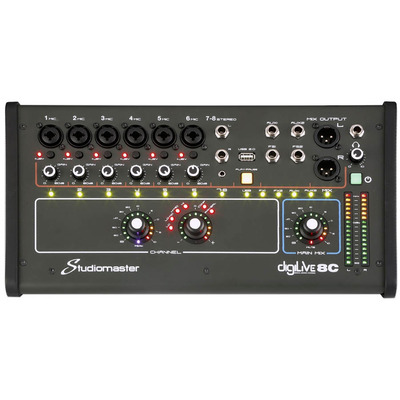
£330.00 at Terralec · best for acoustic acts and churches wanting app control
The Studiomaster DigiLive 8 is a small digital mixer that can be controlled from a phone, tablet or laptop over Wi-Fi or LAN, which means a sound person can walk the room and adjust the mix from where the audience sits. If the wireless link drops, the front panel controls still work, which the retailer describes as a failsafe. The DSP includes parametric EQ, graphic EQ, compressor/gate and reverb and delay effects, giving more processing per channel than any analogue desk at a similar price. The MP3 section can play back and record at the same time. With six mic inputs and one stereo input it suits a duo, a small worship band or a lectern and a couple of singers rather than a full band.
✓ Pros
- Mix from a phone or tablet anywhere in the room
- Full digital processing on each channel
- Physical controls still work if Wi-Fi fails
✕ Cons
- Only six mic inputs
- Digital menus take longer to learn than knobs
- Weight of 8kg is high for its channel count
7. Best premium
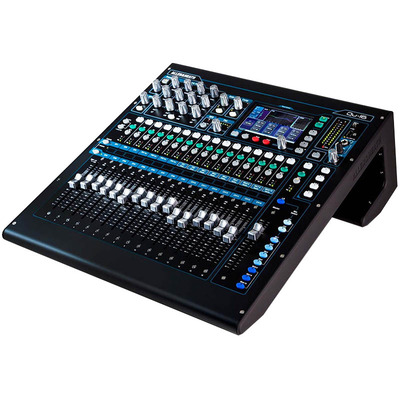
Allen & Heath QU-16 Digital Mixer 16 Microphone Inputs 3 Stereo Motorised Faders
£2031.00 at Terralec · best for gigging bands, school theatres and venues
The Allen & Heath QU-16 is the most capable mixer in this list and the one to look at if you mix full bands or school productions. It has 16 mono inputs on XLR and TRS, three stereo inputs, 12 XLR outputs and 16 busses, so you can run several separate monitor mixes as well as the main PA. It has a fader per mono input, which cuts down on layer switching, and a touch screen with total recall, so a whole show's settings can be saved as scenes and brought back for the next rehearsal. Allen & Heath also make digital stage boxes for the QU range, which lets you run one cable to the stage instead of a heavy multicore. It is in the premium band and there is a real learning curve, but it is the kind of desk a venue or school can grow into for years.
✓ Pros
- Sixteen mic inputs with a fader for each
- Scenes and total recall for repeat shows
- Plenty of outputs and busses for monitor mixes
- Smallest QU model can be rack mounted
✕ Cons
- Premium price band
- Overkill for speech-only or small acoustic use
- 10kg desk needs a proper case for transport
How many channels do you need?
Count every source you will plug in at the same time. Each vocal microphone needs a mono mic channel. A keyboard, laptop or backing track player usually takes a stereo channel. A drum kit can need anything from two to eight mics depending on how much you mic it. Then add one or two spares for the guest singer or the extra instrument that always turns up.
Be careful with how mixers are named. A 12 channel mixer rarely has twelve mic inputs; the number usually counts stereo channels as two each. The Studiomaster 12 channel model in this guide, for example, has eight mic channels and two stereo channels. Always check the number of mic inputs in the specification, because that is usually what runs out first.
Analogue vs digital mixers
Analogue mixers have one knob per function. They are quick to learn, easy for volunteers and pupils to understand at a glance, and there are no menus to get lost in. The downside is that nothing is saved: if someone moves a knob, your settings are gone, and you are limited to the effects and EQ built into the desk.
Digital mixers put more processing on every channel, such as parametric EQ, compressors and gates, and let you save a whole setup as a scene. Many can be controlled from a tablet. That suits bands who play the same set repeatedly and churches or schools where different people run the sound each week, because a known-good scene can be recalled at the start. The trade-off is a steeper learning curve and, at the top end, a higher price.
Onboard effects, USB and Bluetooth
Built-in reverb and delay make vocals sound fuller without buying a separate effects unit, and most of the analogue desks here include a DSP effects section. A footswitch socket is handy for singers who want to turn effects off between songs.
USB can mean different things. On some mixers it is just a media player for MP3s on a memory stick; on others it is a full audio interface that sends sound to and from a computer for recording or streaming. If you plan to record or livestream, check the listing says the mixer works as a computer audio device rather than only a USB player. Bluetooth is useful for interval music from a phone, but it is a playback convenience rather than a professional input.
Powered or unpowered, and other things to check
Check what speakers you have. Active speakers have their own amplifiers and only need a standard mixer. Passive speakers need amplification, which a powered mixer provides in one box. Buying a powered mixer for active speakers wastes money and weight.
Also look at phantom power if you use condenser microphones (common for choirs and lecterns), the number of aux sends if performers need their own monitor mixes, and whether the main outputs are balanced XLR, which handle longer cable runs better. For installation in a school or church, rack mounting and a lockable case can matter as much as the features.
FAQs
What size mixer do I need for a small band?
A typical four or five-piece band with vocals, guitars, bass and keys usually needs eight to twelve mic inputs if the drums are only lightly miked, and sixteen or more if every drum is miked. Count your actual sources and add a couple of spares before choosing.
Is a digital mixer worth it for a church or school?
Often yes, because different volunteers can recall the same saved scene each week and avoid accidental changes. If the people running sound are very new, a simple analogue desk can be less intimidating, so consider who will actually use it.
What is phantom power and do I need it?
Phantom power is a 48V supply sent down the microphone cable to power condenser microphones. Standard dynamic vocal mics do not need it. If you use condenser mics for choirs, lecterns or overhead drums, make sure the mixer provides it on the channels you need.
What is the difference between a DJ mixer and a PA mixer?
A DJ mixer is designed to blend music sources, with a crossfader, phono inputs for turntables and usually only one or two mic channels. A PA mixer has many microphone channels with EQ and aux sends for live performers. Mobile DJs who also host speeches may want both or a DJ mixer with a mic override.
Can I record a gig through a mixer's USB port?
Many mixers can record the main stereo mix to a USB stick or SD card, and some act as a computer audio interface. Recording each channel separately for later mixing usually needs a digital mixer with multitrack USB, so check the specification before you buy if that matters.
Want to see everything? Browse all pro audio or read our other buying guides.
Affiliate disclosure: buychecked may earn commission from qualifying purchases made via links on this page — at no extra cost to you. Prices checked against live merchant feeds.